ko-fi

问题背景

  1. 通过 SynoCommunity 的套件安装了 Gitea
  2. 标准安装和 Web 界面配置(生成并添加 SSH 密钥)完成后,尝试通过 SSH 连接时遇到问题

问题现象

使用命令 ssh -Tv sc-gitea@nas 测试连接时,虽然 SSH 客户端能成功建立连接,并且服务器也接受了公钥认证,但最终会话被拒绝,提示 Permission denied, please try again

解决方案

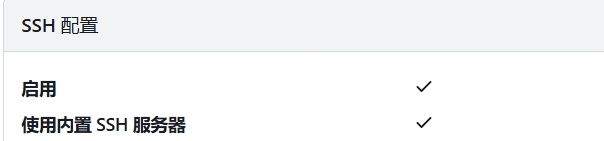
启用 Gitea 内置 SSH 服务器

  • 编辑配置文件:/var/packages/gitea/var/conf.ini
  • 将 SSH_PORT = 22 后添加 START_SSH_SERVER = true

ko-fi

创建虚拟环境

1
2
cd /d C:\tasks\myrepo
python -m venv .venv

激活虚拟环境

CMD:

1
.venv\Scripts\activate.bat

PowerShell:

1
.venv\Scripts\Activate.ps1

安装依赖

1
pip install -r requirements.txt

python 指向哪里

CMD:

1
where python

PowerShell:

1
Get-Command python

错误

signal.signal(signal.SIGALRM, timeout_handler)
^^^^^^^^^^^^^^
AttributeError: module ‘signal’ has no attribute ‘SIGALRM’. Did you mean: ‘SIGABRT’?

方案 :判断平台,仅在非 Windows 使用 SIGALRM

1
2
3
4
5
6
7
8
9
import signal
import platform

def timeout_handler(signum, frame):
raise TimeoutError("操作超时")

if platform.system() != "Windows":
signal.signal(signal.SIGALRM, timeout_handler)
signal.alarm(10)

更新单个pip包

1
pip install --upgrade 包名

查看哪些包可以更新

1
pip list --outdated

想把 requirements.txt 里的包都更新到最新版本

1
pip install -r requirements.txt --upgrade

ko-fi

这是一个 Unity 编辑器脚本,用于导出 PSD/PSB 文件中通过 PSD Importer 生成的所有子 Sprite 为独立的 PNG 图片。

菜单入口

Tools/PSD/导出选中PSB的所有子Sprite

功能流程

  1. 获取当前选中的 .psb 文件
  2. 加载该 PSD 文件包含的所有 Asset(通过 AssetDatabase.LoadAllAssetsAtPath
  3. 筛选出所有 Sprite 类型的资源
  4. 在 PSD 同目录下创建 <文件名>_SubSprites 文件夹
  5. 将每个 Sprite 裁剪为独立 PNG 导出

原始使用场景

Unity 的 PSD Importer 可以将 PSD 文件作为多图层 Sprite 图集导入,每个图层自动生成为一个子 Sprite。但 Unity 没有提供反向导出功能,这个脚本就是用来解决这个痛点——将已导入的 Sprite 重新导出为独立的 PNG 图片。

典型用途

  • 导出 PSD 分层后的 Sprite 供其他工具/项目使用
  • 备份或检查 PSD Importer 实际生成的 Sprite 内容
  • 将图集拆分为单独的资源文件
1
2
3
4
5
6
7
8
9
10
11
12
13
14
15
16
17
18
19
20
21
22
23
24
25
26
27
28
29
30
31
32
33
34
35
36
37
38
39
40
41
42
43
44
45
46
47
48
49
50
51
52
53
54
55
56
57
58
59
60
61
62
63
64
65
66
67
68
69
70
71
72
73
74
75
76
77
78
79
80
81
82
83
84
85
86
87
88
using System;
using System.IO;
using System.Linq;
using UnityEditor;
using UnityEngine;
using Object = UnityEngine.Object;

public class ExportPsbSubSprites
{
[MenuItem("Tools/PSD/导出选中PSB的所有子Sprite")]
public static void ExportSelectedPsbSprites()
{
Object selected = Selection.activeObject;
if (selected == null)
{
Debug.LogError("请先选中 .psb 文件");
return;
}

string path = AssetDatabase.GetAssetPath(selected);
var assets = AssetDatabase.LoadAllAssetsAtPath(path);

string outputDir = Path.Combine(Path.GetDirectoryName(path), Path.GetFileNameWithoutExtension(path) + "_SubSprites");
Directory.CreateDirectory(outputDir);

foreach (var a in assets)
{
if (a is Sprite sprite)
{
ExportSprite(sprite, SafeCombine(outputDir, sprite.name + ".png"));
}
}

AssetDatabase.Refresh();
Debug.Log("导出完成: " + outputDir);
}

public static string SafeCombine(string directory, string fileName)
{
if (string.IsNullOrWhiteSpace(directory))
throw new ArgumentException("directory 不能为空", nameof(directory));

if (string.IsNullOrWhiteSpace(fileName))
throw new ArgumentException("fileName 不能为空", nameof(fileName));

// 清理文件名中的非法字符
var invalidChars = Path.GetInvalidFileNameChars();
var safeFileName = new string(fileName
.Where(c => !invalidChars.Contains(c))
.ToArray());

// 防止清理后为空
if (string.IsNullOrWhiteSpace(safeFileName))
throw new ArgumentException("fileName 清理后为空,原始文件名可能全是非法字符");

return Path.Combine(directory, safeFileName);
}

static void ExportSprite(Sprite sprite, string outputPath)
{
Texture2D tex = sprite.texture;
Rect rect = sprite.rect;

string texPath = AssetDatabase.GetAssetPath(tex);
var importer = AssetImporter.GetAtPath(texPath) as TextureImporter;
bool reset = false;

if (importer != null && !importer.isReadable)
{
importer.isReadable = true;
importer.SaveAndReimport();
reset = true;
}

Texture2D outTex = new Texture2D((int)rect.width, (int)rect.height, TextureFormat.RGBA32, false);
outTex.SetPixels(tex.GetPixels((int)rect.x, (int)rect.y, (int)rect.width, (int)rect.height));
outTex.Apply();

File.WriteAllBytes(outputPath, outTex.EncodeToPNG());
Object.DestroyImmediate(outTex);

if (reset && importer != null)
{
importer.isReadable = false;
importer.SaveAndReimport();
}
}
}

ko-fi

土耳其语大小写转换

土耳其语的大小写转换规则与英语(及大多数拉丁字母语言)存在显著差异,这在计算机科学界被称为“土耳其语 I 问题”,其实还有阿塞拜疆语也有这个问题。

1. 核心差异:有点与无点的“I”

在英语中,字母 i 的大写是 I。但在土耳其语中,这两个字母分别属于两组不同的对应关系 :

  • 有点字母组:小写 i 对应大写 İ(带点的 I)。

  • 无点字母组:小写 ı(无点 i)对应大写 I(无点 I)。

这意味着:

  • 在英语环境下:iI

  • 在土耳其语环境下:iİ 以及 ıI

2. 技术与软件开发中的问题

由于许多编程语言(如 C#、Java等)的字符串转换函数(如 toLowerCase()toUpperCase())在默认情况下会参考系统的本地化设置(Locale),这导致了大量的软件缺陷 :

  • 关键字失效:如果一个编译器或解析器在土耳其语环境下运行,将大写的英文单词 “INFO” 转换为小写,结果会变成 “ınfo”(使用无点 ı),而不是预期的 “info”。这会导致程序无法识别指令或配置 。

  • 标签损坏:在游戏引擎(如 Unreal Engine)中,如果对包含富文本标签的代码进行文化敏感的大小写转换,<img id="..."> 可能会变成 <İMG İD="...">,导致系统无法识别标签。

  • 文件系统错误:如果文件名包含 “I”,在土耳其语环境下转换为小写后,可能因为字符不匹配而导致无法找到文件

3. 历史与设计原因

  • Unicode 设计:Unicode 为了保持与早期字符集(如 ISO-8859-9)的兼容性,将土耳其语的无点大写 I 与英语的大写 I 统一使用了同一个码点(U+0049),这使得大小写转换必须依赖于语言上下文(Locale)才能正确执行 。

  • 语言改革:土耳其语在 20 世纪 20 年代拉丁化改革时,为了实现“一个字母对应一个声音”的原则,特意区分了这两种元音 。

4. 解决方案

为了避免这类 Bug,当需要将字符串转换为统一的大小写以便后续处理(如比较或存储)时,不应直接使用 ToUpper()ToLower(),因为它们默认使用系统的当前文化设置(CurrentCulture)。

浮点数转换字符串小数点.变成,

在许多欧洲国家或地区的语言设置中,默认的数字小数点分隔符是逗号(,)而不是点(.)。在执行 ToString() 操作时,.NET 会根据当前线程的文化环境自动选择分隔符。

解决方法

使用固定文化(CultureInfo.InvariantCulture)

InvariantCulture 的默认小数点分隔符始终是 .,且不会随系统语言环境的变化而改变

1
2
3
double value = 1.5;
string result = value.ToString(System.Globalization.CultureInfo.InvariantCulture);
// 结果始终为 "1.5"

Application.systemLanguage返回语言标识错误

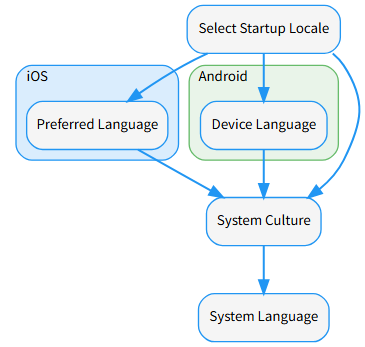
一些语言在调用Application.systemLanguage查询时会被错误的认为成马来语

解决方法

  • iOS - Preferred Language: 使用 iOS Preferred Language

    • 根据 iOS 本地化指南,用户的 preferredLanguages 是在 iOS 设置(设置 ➞ 通用 ➞ 语言与地区)中列出的语言顺序,项目中只取第一个即可。
1
2
[System.Runtime.InteropServices.DllImport("__Internal")]
extern static string getPreferredLanguage();
1
2
3
4
5
6
7
8
9
10
11
12
13
14
15
extern "C"
{
const char* getPreferredLanguage()
{
NSString* language = [[NSLocale preferredLanguages]firstObject];
if (language == NULL)
return NULL;

const char* languageCode = [language UTF8String];
const size_t len = strlen(languageCode) + 1;
char* pl = (char*)malloc(len);
strlcpy(pl, languageCode, len);
return pl;
}
}
1
2
3
4
5
6
7
8
9
10
11
12
13
14
15
16
17
static string GetAndroidDeviceLanguage()
{
using (AndroidJavaClass cls = new AndroidJavaClass("java.util.Locale"))
{
if (cls != null)
{
using (AndroidJavaObject locale = cls.CallStatic<AndroidJavaObject>("getDefault"))
{
if (locale != null)
{
return locale.Call<string>("toLanguageTag");
}
}
}
}
return null;
}
1
CultureInfo.CurrentUICulture.TwoLetterISOLanguageName
1
Application.systemLanguage

阿拉伯语处理

Arabic Support for Unity

Tashkeel (发音/变音符号)

Tashkeel(阿拉伯语:تشكيل)是指阿拉伯语中的变音符号发音符号。由于阿拉伯字母主要是辅音,Tashkeel 符号被添加在字母的上方或下方,用以指示短元音、音节重复或静音。

  • 常见类型:包括 Fathah (开口符)、Kasrah (齐齿符)、Dammah (合口符)、Sukun (静符)、Shadda (叠音符) 等。

  • 作用:这些符号对于准确的读音和理解句意至关重要。在普通的现代阿拉伯语出版物中,Tashkeel 有时会被省略,但在宗教文献(如古兰经)、诗歌和初级语言教材中是必须显示的。

  • Unity 开发中的挑战:并非所有字体都能完美支持这些符号的渲染。在使用 Arabic Support for Unity 插件时,开发者可以选择显示或隐藏这些符号。

Hindu numbers (印地数字 / 东阿拉伯数字)

在 Unity 插件(如 ArabicSupport)的语境下,Hindu numbers 指的是东阿拉伯数字(Eastern Arabic numerals),即在阿拉伯语、波斯语和乌尔都语地区广泛使用的数字形状 。

  • 数字形态:它们看起来像这样:٠ ١ ٢ ٣ ٤ ٥ ٦ ٧ ٨ ٩

  • 命名困惑

    • 我们平时用的 0, 1, 2… 在国际上被称为“西阿拉伯数字”(Western Arabic numerals)。

    • 插件中提到的 Hindu numbers 其实是指在阿拉伯语国家常见的“东阿拉伯数字”。

  • Unity 开发中的功能

    • 自动转换Arabic Support for Unity 插件提供选项,可以将标准英文字符(0-9)自动转换为这种特定的数字形状。
1
2
3
4
5
6
7
8
9
10
11
12
13
14
15
16
17
using UnityEngine;
using System.Collections;
using ArabicSupport;

public class FixArabic3DText : MonoBehaviour {

public bool showTashkeel = true;
public bool useHinduNumbers = true;

void Start ()
{
TextMesh textMesh = gameObject.GetComponent<TextMesh>();
string fixedText = ArabicFixer.Fix(textMesh.text, showTashkeel, useHinduNumbers);
gameObject.GetComponent<TextMesh>().text = fixedText;
Debug.Log(fixedText);
}
}

CJK 字体缺失

中文等东亚字符显示为方块(□)的主要原因是字体文件不包含 CJK(中日韩)字符集,或者 TextMeshPro (TMP) 的字体资产(Font Asset)未包含对应字符的位图信息。

  • 选择支持 CJK 的字体

  • 建议将 Atlas Resolution 设置为 2048x20484096x4096,因为中文等东亚字符数量巨大,需要更大的贴图空间

  • 对于聊天系统等无法预知内容的文本,可以使用代码在运行时动态添加字符到字体资产中(如使用 chineseFont.TryAddCharacters(c))并强制更新

ko-fi

当项目需要在不重新发布应用的前提下,增量地引入新资源或从其他项目拉取内容时,运行时加载“附加 Catalog”是最干净、最稳的方式。

加载附加 Catalog

  • 加载附加 Catalog: 使用 Addressables.LoadContentCatalogAsync(path, autoReleaseHandle) 从本地文件或远程托管地址加载新的 Catalog;加载完成后,Catalog 中的键可直接用于 Addressables.LoadAssetAsync 等 API。

  • 操作句柄释放: 若想让远程 Catalog 被重新下载,之前对同一路径的 LoadContentCatalogAsync 必须释放;设置 autoReleaseHandle = true 可自动避免操作缓存导致的“拿到旧结果”问题。

  • 不可卸载: 已加载的 Catalog 不能“卸载”,但可以“更新”。更新前需释放对应加载操作句柄。

1
2
3
4
5
6
7
8
9
public IEnumerator Start()
{
// 加载一个 Catalog,并自动释放操作句柄。
AsyncOperationHandle<IResourceLocator> handle
= Addressables.LoadContentCatalogAsync("path_to_secondary_catalog", true);
yield return handle;

// ...
}

只检查远程 Catalog 是否有更新

只检查远程 Catalog 是否有更新,而不立即下载或更新,可以使用Addressables.CheckForCatalogUpdates()。这个方法会返回一个AsyncOperationHandle<List<string>>,其中包含需要更新的 Catalog 名称列表。你可以在完成回调里判断是否有更新,然后再决定是否调用 Addressables.UpdateCatalogs()

  • 只检查,不更新: 使用 CheckForCatalogUpdates() 就能只获取更新信息,而不会阻塞或下载新 Catalog。

  • 哈希文件机制: 如果远程目录下有 .hash 文件,Addressables 会根据哈希判断是否有新版本。

  • 更新时机: 如果只想提示用户有更新,可以在 UI 上显示提示;真正调用 UpdateCatalogs() 时再下载。

1
2
3
4
5
6
7
8
9
10
11
12
13
14
15
16
17
18
19
20
21
22
23
24
25
26
27
28
29
30
31
32
33
IEnumerator CheckRemoteCatalogs()
{
// 创建一个列表来存储需要更新的 Catalog
List<string> catalogsToUpdate = new List<string>();

// 调用检查方法
AsyncOperationHandle<List<string>> checkHandle = Addressables.CheckForCatalogUpdates();

// 在 Completed 回调中获取结果
checkHandle.Completed += op =>
{
catalogsToUpdate.AddRange(op.Result);
};

// 等待操作完成
yield return checkHandle;

// 判断是否有需要更新的 Catalog
if (catalogsToUpdate.Count > 0)
{
Debug.Log("发现远程 Catalog 有更新: " + string.Join(",", catalogsToUpdate));
// 此时你可以选择是否调用 UpdateCatalogs 来真正更新
// yield return Addressables.UpdateCatalogs(catalogsToUpdate);
}
else
{
Debug.Log("远程 Catalog 没有更新");
}

// 释放操作句柄
checkHandle.Release();
}

更新远程 Catalog

更新远程 Catalog(而不是本地 Catalog),关键在于使用 Addressables.UpdateCatalogs() 并确保你传入的远程 Catalog 名称列表。

  • 只更新远程 Catalog:CheckForCatalogUpdates() 会返回所有需要更新的 Catalog 名称(包括远程和本地)。

如果你只想更新远程 Catalog,可以在结果列表里筛选出远程 Catalog 的名字(通常是加载时指定的 URL 或远程路径)。

  • 阻塞特性: UpdateCatalogs 会阻塞其他 Addressables 请求,直到更新完成。
1
2
3
4
5
6
7
8
9
10
11
12
13
14
15
16
17
18
19
20
IEnumerator UpdateRemoteCatalogs(List<string> catalogsToUpdate)
{
// 调用 UpdateCatalogs 并传入需要更新的远程 Catalog 列表
AsyncOperationHandle<List<IResourceLocator>> updateHandle =
Addressables.UpdateCatalogs(catalogsToUpdate);

yield return updateHandle;

if (updateHandle.Status == AsyncOperationStatus.Succeeded)
{
Debug.Log("远程 Catalog 更新成功");
}
else
{
Debug.LogError("远程 Catalog 更新失败: " + updateHandle.OperationException);
}

updateHandle.Release();
}

参考文档

https://docs.unity3d.com/Packages/com.unity.addressables@1.22/manual/LoadContentCatalogAsync.html

ko-fi
📌 功能说明

有时候你可能想获取一个准确的网络时间(比如服务器时间),但又不希望使用 NTP(UDP 123 端口) 协议,而是希望通过更常见的 HTTP 协议 来获取时间。

⚠️ 注意:HTTP 本身不提供标准的时间接口,但很多网站会在 HTTP 响应头中返回一个 `Date` 字段,它代表 服务器的当前时间(UTC 时间)。我们可以利用这个特性,通过访问某个网站,解析 HTTP 响应头中的 Date 来间接获取网络时间。


✅ 推荐方法:通过 HTTP 请求获取响应头中的 Date 字段(服务器时间)

这是最简单、最常用的方式,不需要特殊协议,只需要发起一个 HTTP 请求(GET 或 HEAD),然后读取响应头里的 Date 字段即可


🧩 实现原理

发送 HTTP 请求(比如访问 https://www.google.comhttps://www.baidu.com

服务器在返回的 HTTP 响应头中会包含一个 `Date:` 字段,表示服务器发送该响应时的 UTC 时间

我们解析这个 Date 字符串 → 转为 C# 的 DateTime 对象


🛠 示例代码:使用 Unity / C# 通过 HTTP 获取网络时间(UTC)

适用于 C#(包括 Unity)环境,使用 `UnityWebRequest` 或 `HttpWebRequest`


✅ 方法:使用 UnityWebRequest(推荐在 Unity 中使用)

1
2
3
4
5
6
7
8
9
10
11
12
13
14
15
16
17
18
19
20
21
22
23
24
25
26
27
28
29
30
31
32
33
34
35
36
37
38
39
40
41
42
43
44
45
46
47
48
49
50
51
52
53
54
55
56
57
58
59
60
61
62
63
64
65
66
67
68
69
70
71
using System;
using UnityEngine;
using UnityEngine.Networking;
using System.Collections;

public class HttpTimeFetcher : MonoBehaviour
{
// 可以换成任意一个稳定的 HTTPS 网站,比如:
private string url = "https://www.baidu.com"; // 或者 https://www.google.com

IEnumerator Start()
{
DateTime? networkUtcTime = await GetNetworkTimeViaHttp(url);
if (networkUtcTime.HasValue)
{
Debug.Log("从 HTTP 获取到的服务器时间 (UTC): " + networkUtcTime.Value);
Debug.Log("对应的本地时间: " + networkUtcTime.Value.ToLocalTime());
}
else
{
Debug.LogError("获取网络时间失败");
}
}

/// <summary>
/// 使用 UnityWebRequest 获取 HTTP 响应头中的 Date 时间(UTC)
/// </summary>
/// <param name="url">任意一个 HTTPS 网址</param>
/// <returns>返回服务器时间的 DateTime?(UTC),失败返回 null</returns>
private IEnumerator GetNetworkTimeViaHttp(string url)
{
using (UnityWebRequest request = UnityWebRequest.Head(url))
{
yield return request.SendWebRequest();

if (request.result == UnityWebRequest.Result.Success)
{
string dateHeader = request.GetResponseHeader("Date");
if (!string.IsNullOrEmpty(dateHeader))
{
// 解析 HTTP Date 头(格式是 RFC 1123,比如:Wed, 18 Oct 2023 12:00:00 GMT)
if (DateTime.TryParse(dateHeader, out DateTime serverTime))
{
Debug.Log("解析成功,服务器时间: " + serverTime);
// 注意:Unity 的 DateTime.Parse 默认可能是本地时间,但 HTTP Date 是 UTC 格式!
// 所以此处 serverTime 其实已经是 UTC 时间(只要服务器返回正确)
yield return serverTime.ToUniversalTime(); // 一般不需要,因为本身就是 UTC
DateTime utcTime = serverTime; // 如果服务器返回的是 GMT / UTC 格式,则 serverTime 已是 UTC
yield return utcTime;
}
else
{
Debug.LogWarning("无法解析 Date 头: " + dateHeader);
yield return null;
}
}
else
{
Debug.LogWarning("HTTP 响应头中没有 Date 字段");
yield return null;
}
}
else
{
Debug.LogError("HTTP 请求失败: " + request.error);
yield return null;
}
}
}
}

⚠️ 注意:UnityWebRequest.Head(url) 只发送 HTTP HEAD 请求(不下载内容,更轻量),服务器仍然会返回响应头,包括 Date:

🕒 关于 HTTP Date 格式

HTTP 响应头中的 Date: 是按照 RFC 1123 规范 格式化的字符串,例如:

Date: Wed, 18 Oct 2023 13:42:00 GMT

这个时间是 服务器发送响应时的 UTC (GMT)时间,你可以直接解析成 DateTime,通常它已经代表的是 标准 UTC 时间


🔒 注意事项

项目 说明
✅ 推荐网站 使用稳定的 HTTPS 网站,比如 https://www.baidu.com、https://www.google.com、https://www.microsoft.com
⚠️ HTTP vs HTTPS 优先使用 HTTPS,部分 HTTP 网站可能没有返回 Date 头或被拦截
❌ 不可靠因素 某些服务器可能不返回 Date 头,或者返回的格式不标准
🌍 网络要求 设备必须能访问互联网,某些防火墙/代理可能会拦截请求
🧠 精度 HTTP Date 精度通常是秒级,比 NTP 略低,但一般足够用于大多数业务
🕓 替代方案 如你需要更高精度时间同步,建议使用 NTP(UDP 123 端口)

✅ 总结

方式 说明 推荐度
HTTP 响应头 Date 字段 通过 HTTP 请求(如 HEAD)获取服务器响应头中的 Date: …,解析得到服务器 UTC 时间 ✅ 推荐(简单通用,无需特殊协议)
NTP (UDP 123) 标准时间同步协议,精度高,需 UDP 支持 ✅ 推荐(更专业、更精准)
HTTP API(如 worldtimeapi) 通过调用某些返回 JSON 时间的 HTTP API(如 http://worldtimeapi.org)获取时间 ✅ 可用(但依赖第三方接口)

ko-fi

谷歌文档

https://developer.android.google.cn/develop/ui/views/launch/icon_design_adaptive?hl=zh-cn

设计自适应图标

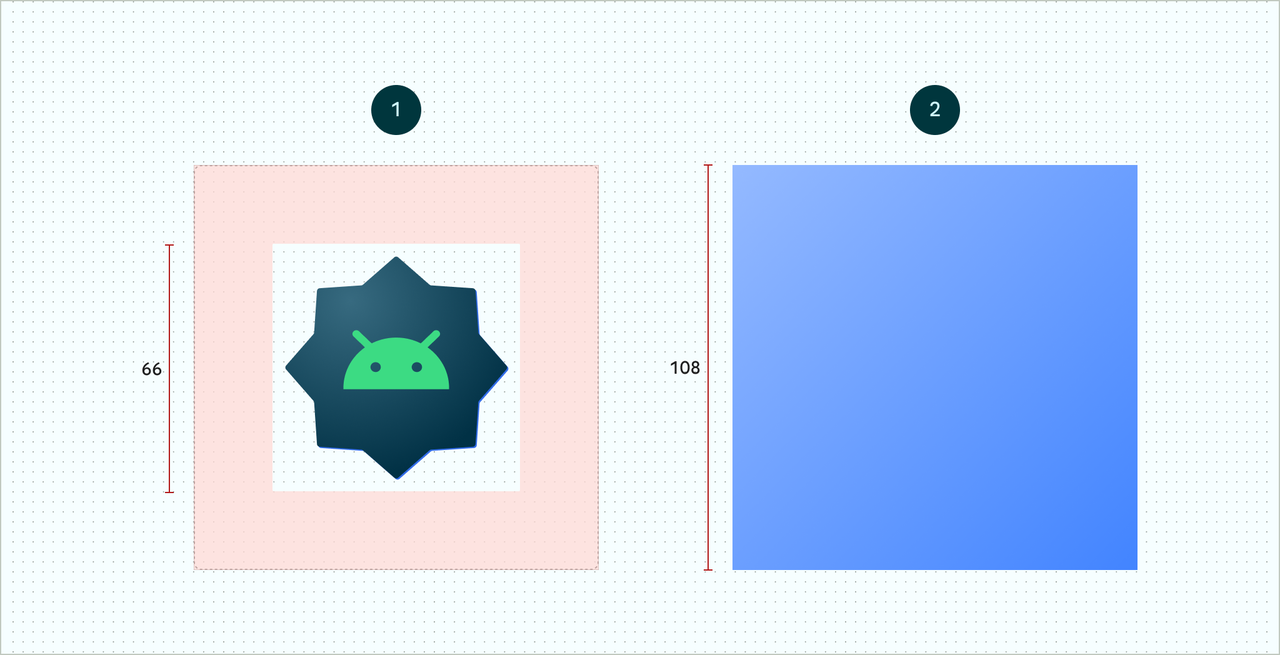
为确保自适应图标支持不同的形状、视觉效果和 用户主题设置,则设计必须符合以下要求:

  • 您必须为图标的彩色版本提供两个图层:一个用于前景另一个用于后景。这些图层可以是矢量,也可以是 但最好使用矢量

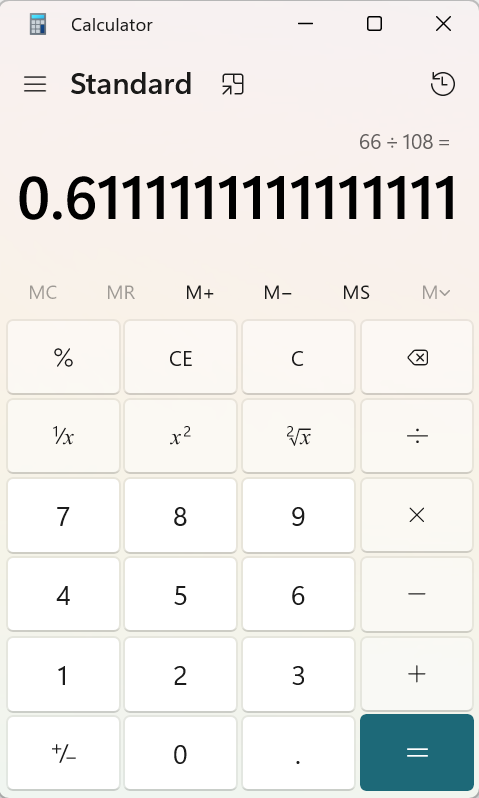
上层比例约为 61%

ko-fi
Outline是让物体在游戏中“脱颖而出”的一种非常流行的方法。

本次分享,我们将使用SpriteRenderer并使用Shader GraphSprite添加外轮廓。

原理

以不同的UV坐标对纹理进行多次采样,并根据这些采样的alpha值确定应该绘制轮廓还是正常纹理。

准备工作

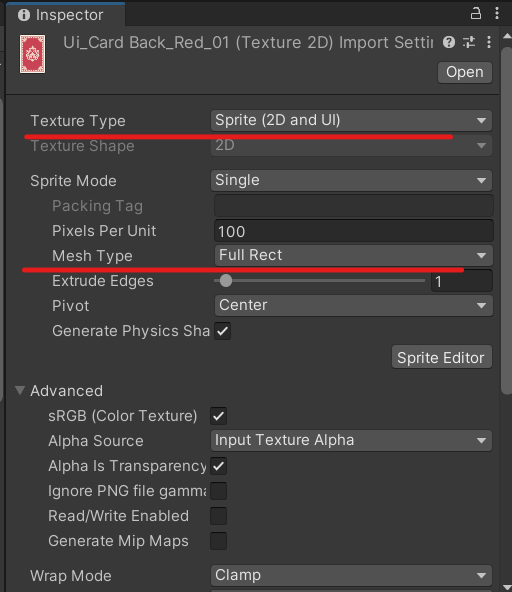
导入我们希望应用Outline Shader的Sprite,Sprite周围需要有透明的边框。导入后在Inspector窗口中设置Texture Type为Sprite(2D和UI),设置Mesh Type为Full Rect。

使用Full Rect的原因是Unity默认会尝试缩小精Sprite Mesh的大小以优化项目。我们想要额外的空间,绘制轮廓的地方。

实现步骤

创建一个Sprite着色器

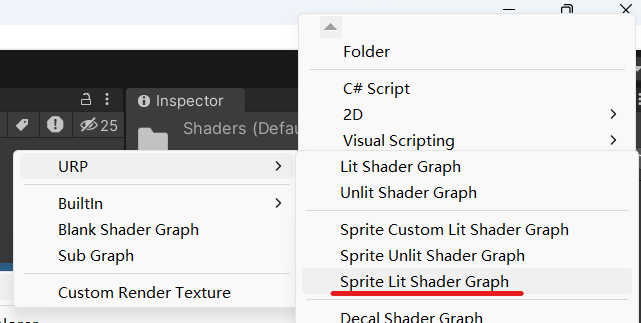
  1. 通过菜单Create | Shader | Universal Render Pipeline | Sprite Lit Shader Graph创建一个新的Shader Graph命名为 SpriteOutlineGraph。
  • 通过菜单Create | Material 创建一个新材质 SpriteOutlineMat,并将材质的Shader设置为 Shader Graphs/SpriteOutlineGraph。

  • 将我们之前导入的Sprite拖入场景,并将上一步创建的材质SpriteOutlineMat拖拽到Sprite对象上。
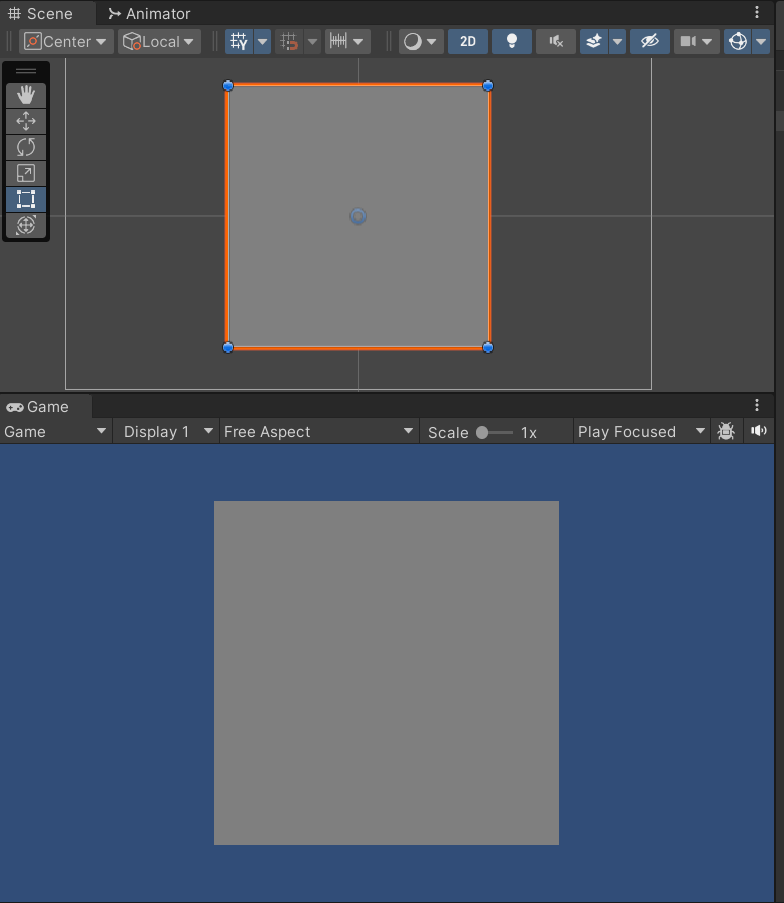
    Sprite会显示为灰色,别着急我们马上让它恢复原样。

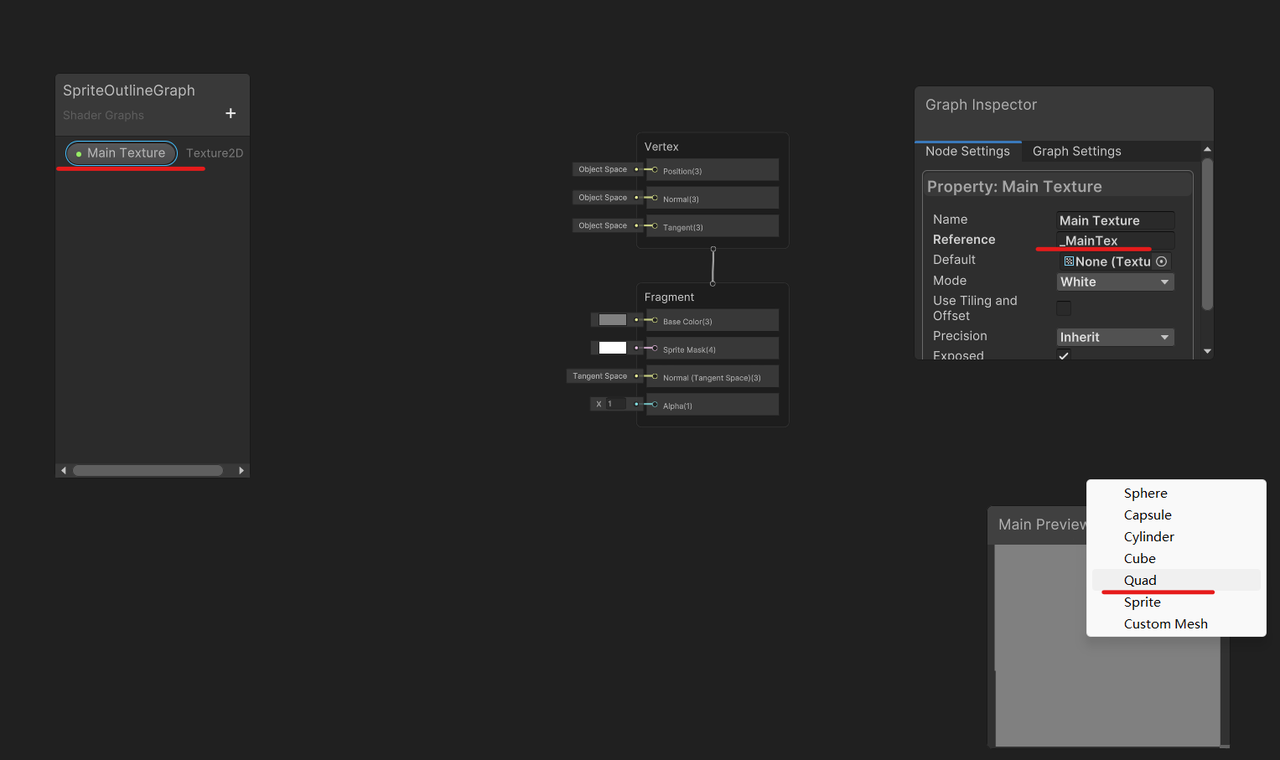
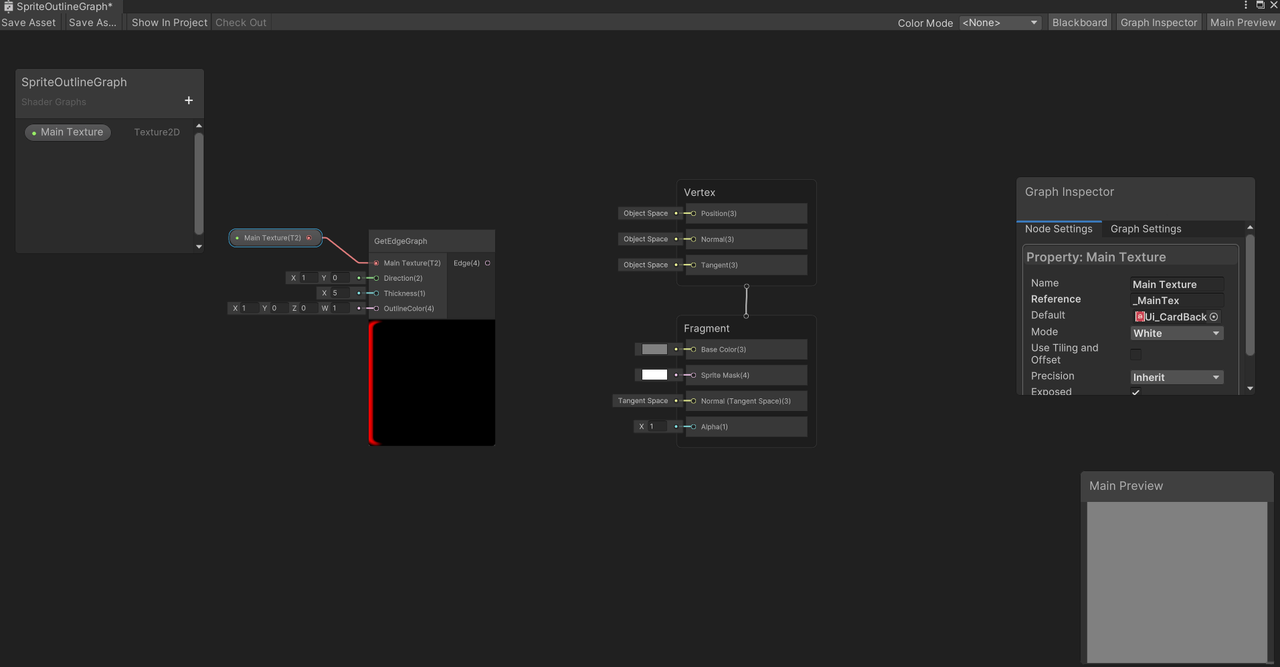
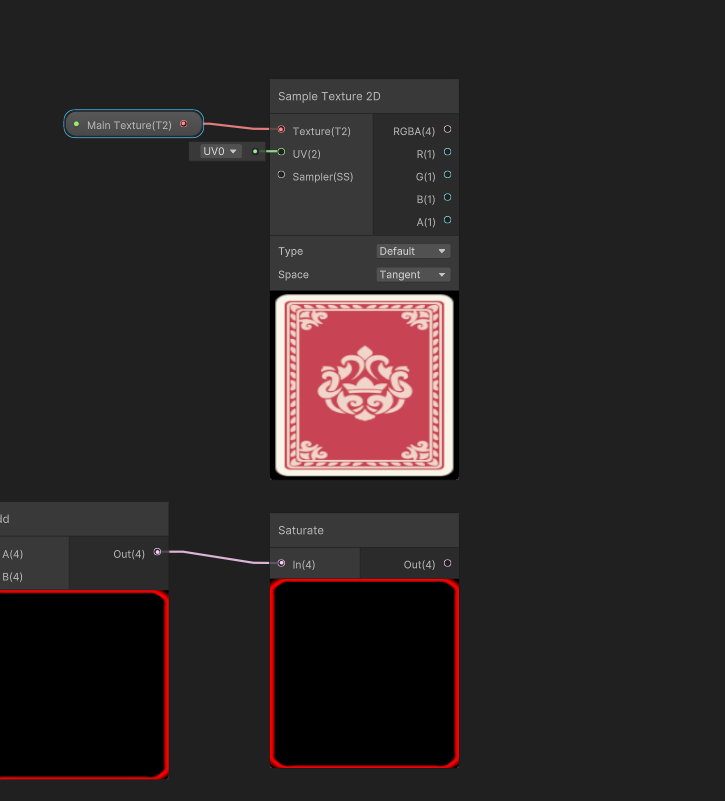
  • 首先,我们把我们的纹理添加回Sprite。为此,我们将对主纹理进行采样。从Blackboard上,单击+按钮并选择Texture 2D,为其命名为Main Texture。打开Graph Inspector并将引用值更改为_MainTex。右键单击Main Preview并选择Quad,以便更轻松地查看着色器将如何工作。

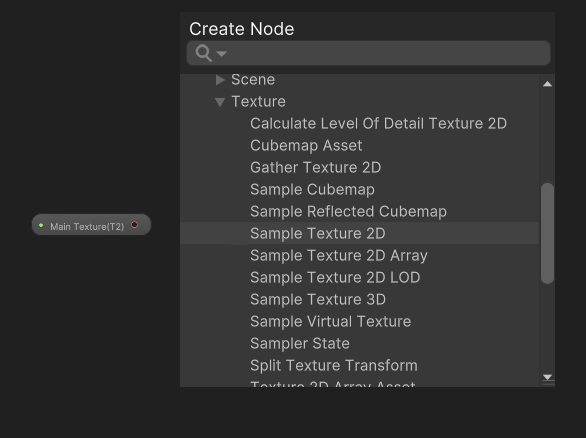
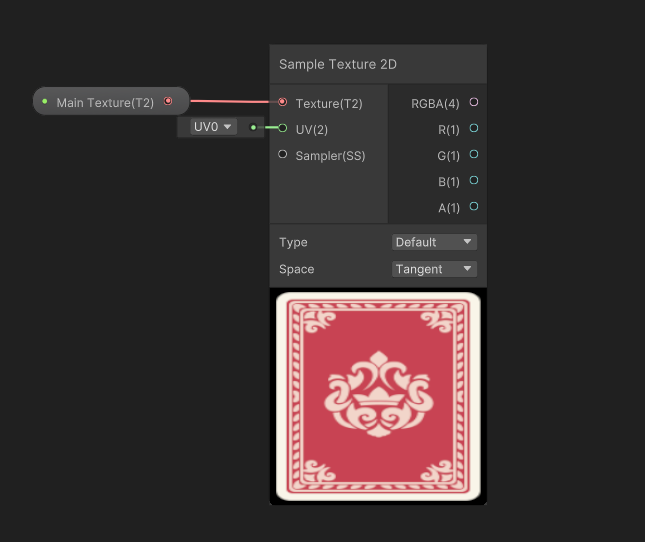
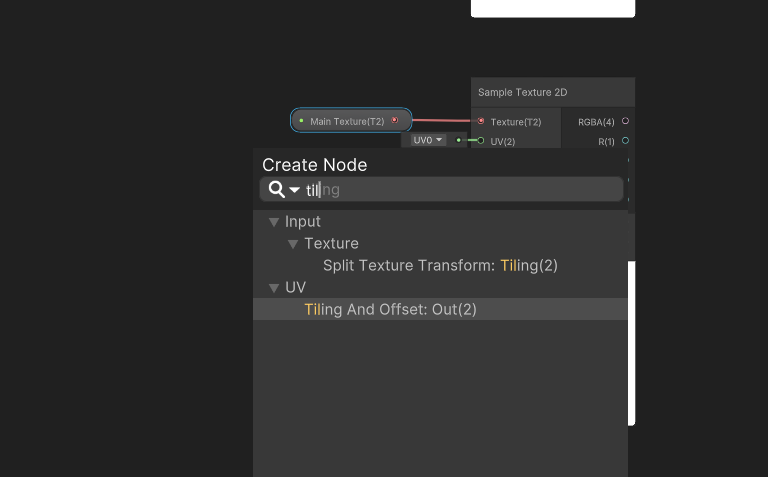
  • 将属性Main Texture拖放到Graph上。右键单击主纹理节点右侧,选择创建节点,选择Input | Texture | Sample Texture 2D。将 Main Texture (T2) 输出连接到Sample Texture 2D节点的Texture (T2)输入。
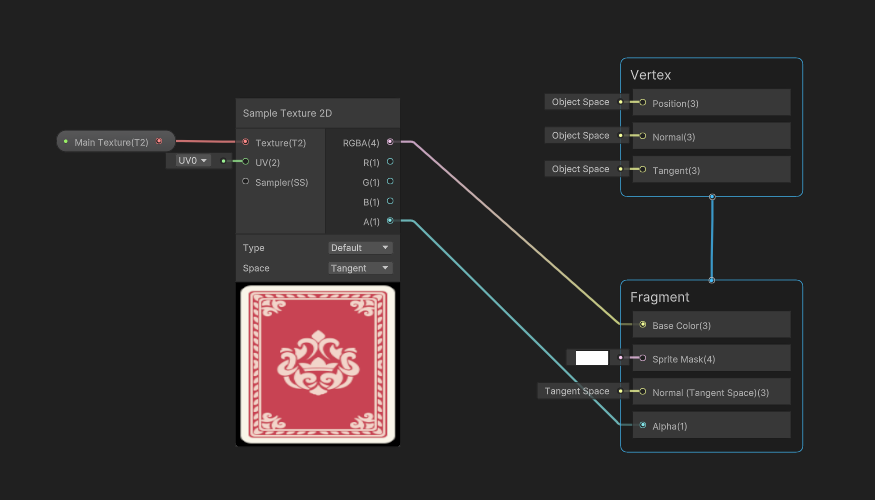
  • 此时,我们可以将RGBA连接到Base Color,将A连接到Fragment节点上的Alpha通道,我们将拥有一个与普通着色器完全相同的Sprite着色器。

创建Outline着色器

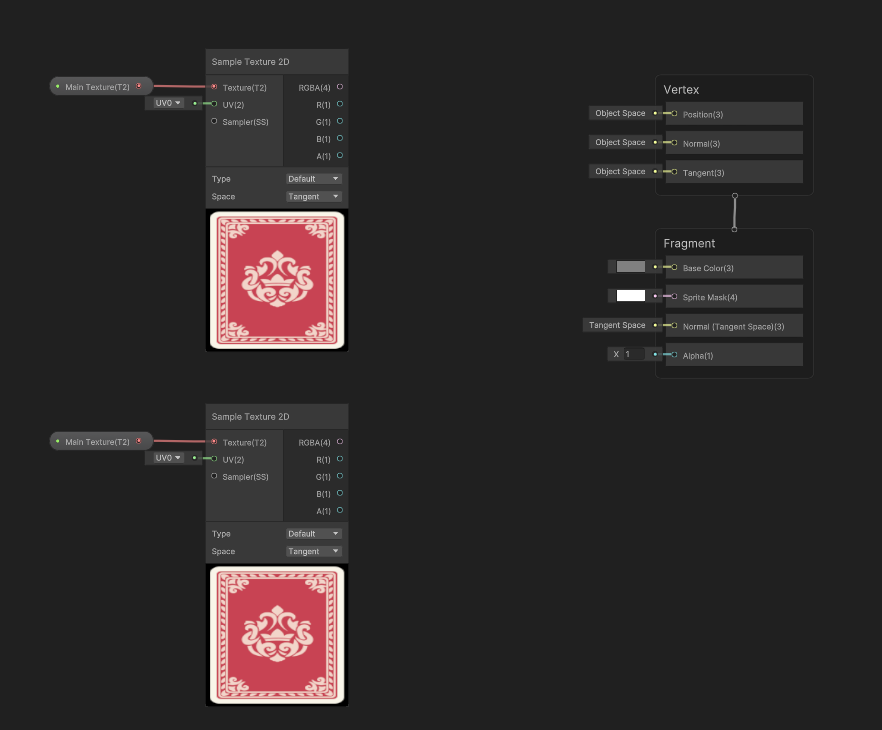
  1. 我们需要一些额外的步骤来实现Outline,首先先断开之前Base Color和Alpha通道的链接。

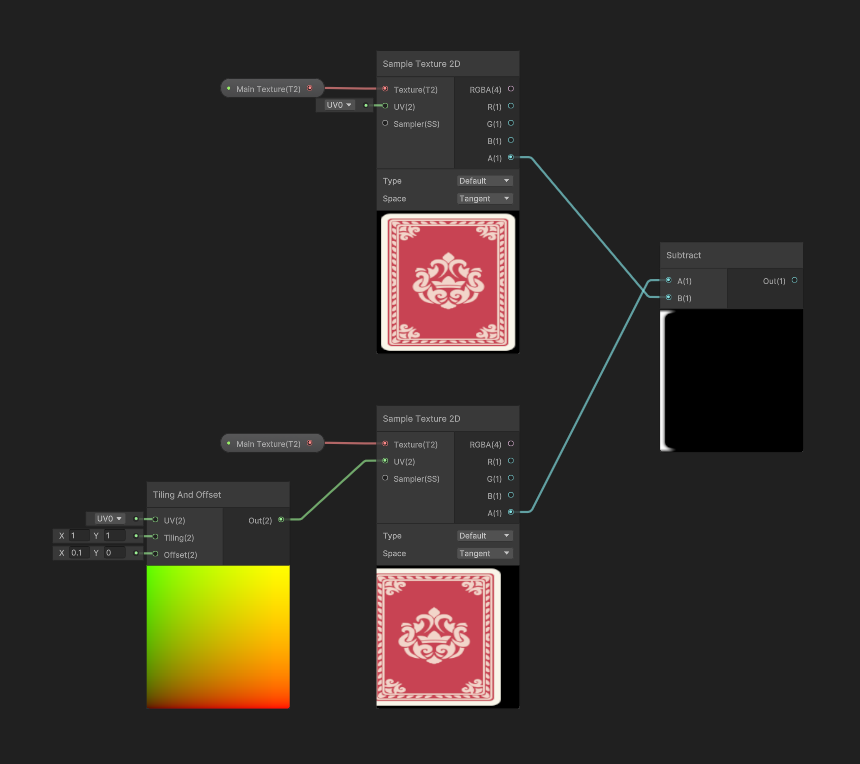
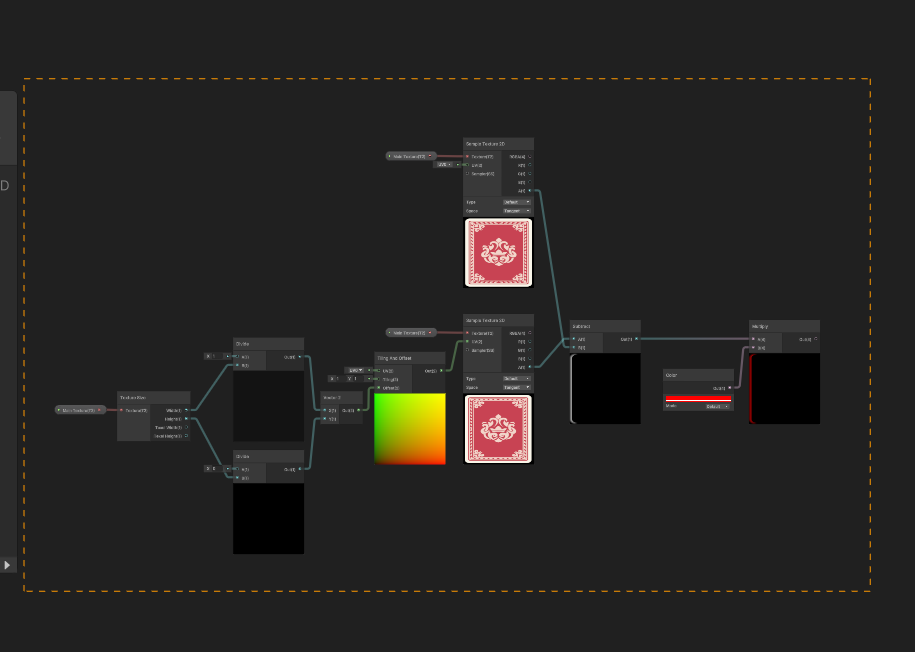
  2. 我们希望原始纹理保持不变,为此我们将创建Main Texture和Sample Texture 2D节点的副本。我们可以通过鼠标拖动框选两个节点。选中后,按Ctrl+C,然后按Ctrl+V。将复制的节点移动到已创建的节点下方。

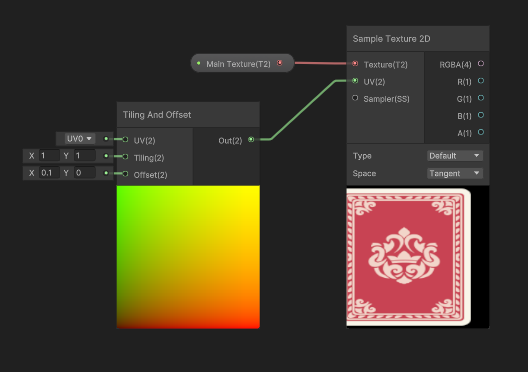
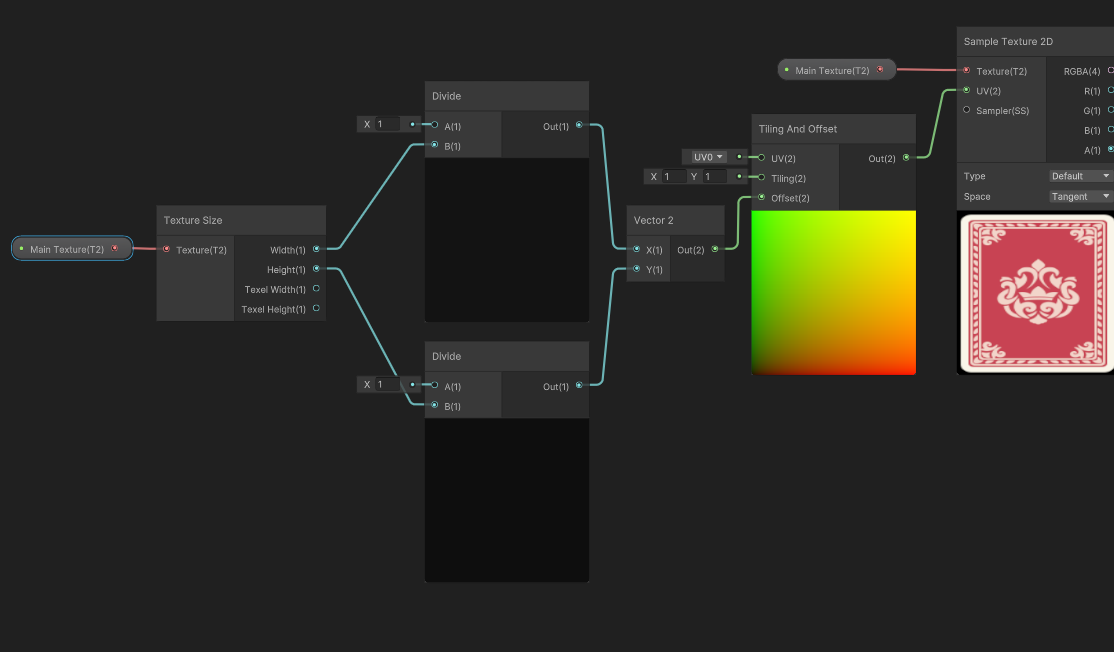
  • 在新创建的Sample Texture 2D节点上,单击并从 UV (2)输入拖动到左侧,然后创建一个Tiling and Offset节点,并将Offset的X值设置为0.1。
  • 在两Sample Texture 2D节点的右侧,创建一个Subtract 节点,将设置了Offset的 Sample Texture 2D的A连接到减法节点的A输入,将原始Sample Texture 2D的A连接到B输入。

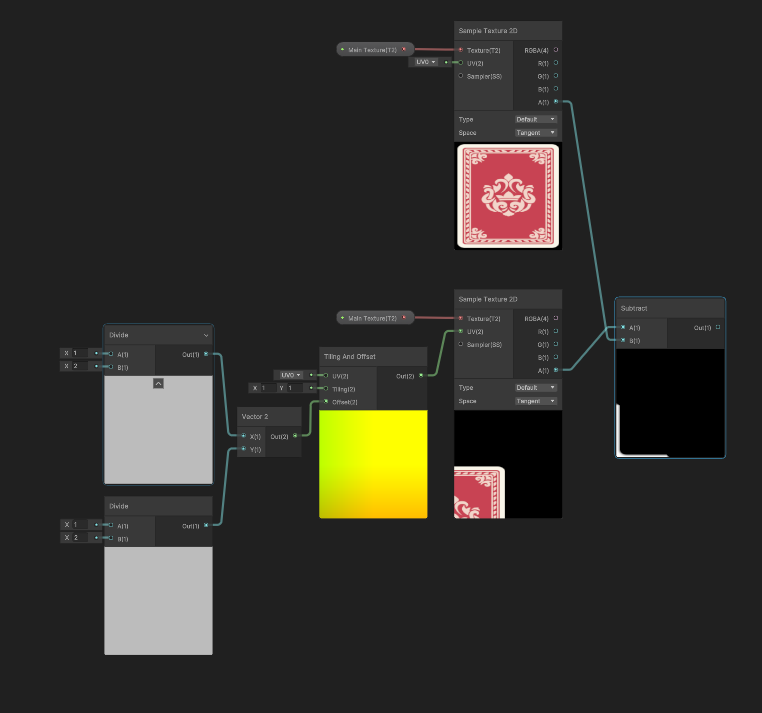
  • 为了把X和Y属性设置为我们想要使用的偏移量,在Tiling and Offset节点的偏移量输入的左侧,创建一个Vector 2节点,并将两个值为½ 的divide 节点作为Vector 2节点的输入。可以看到在X和Y方向上精灵移动了50%。

  • 在Divide节点的左侧添加一个Texel Size节点,并将Main Texture变量连接到Texel Size节点的Texture输入。将Texel Size节点的Width输出连入X offset Divide节点的B输入中,将Texel Size节点的Height连入Y Offset节点的B输入中。 这样就可以按照像素对X,Y方向做偏移了。

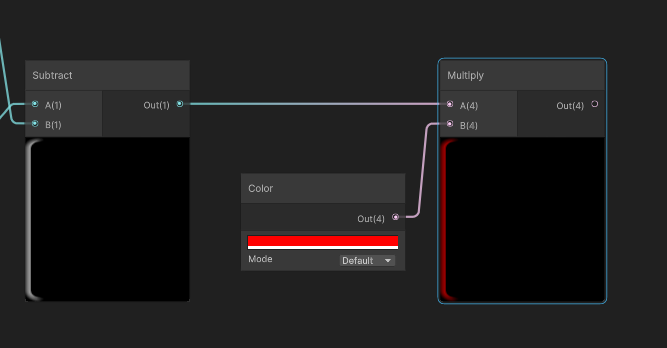
  • 单击并拖动Subtract 节点的输出并创建一个Multiply 节点。在Multiply 节点的左侧,通过空格创建一种颜色,然后选择 Input | Basic | Color。为了易于查看的使用了红色,确保Alpha设置为255。

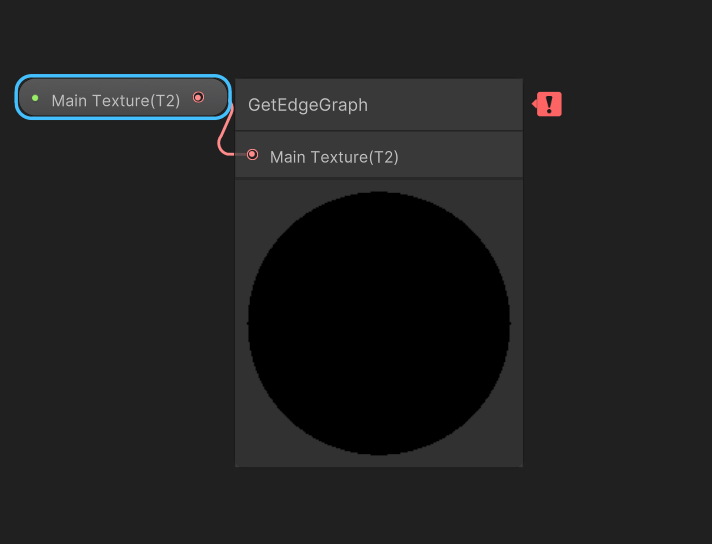
  • 我们希望在四个方向中的每一个方向都重复这种效果。为了使这更容易,我们需要创建一个Sub-graph。一次选择到目前为止已经创建的所有节点,然后右键单击并选择Convert To | Sub-graph。命名为GetEdgeGraph。

GetEdgeGraph Sub-Graph

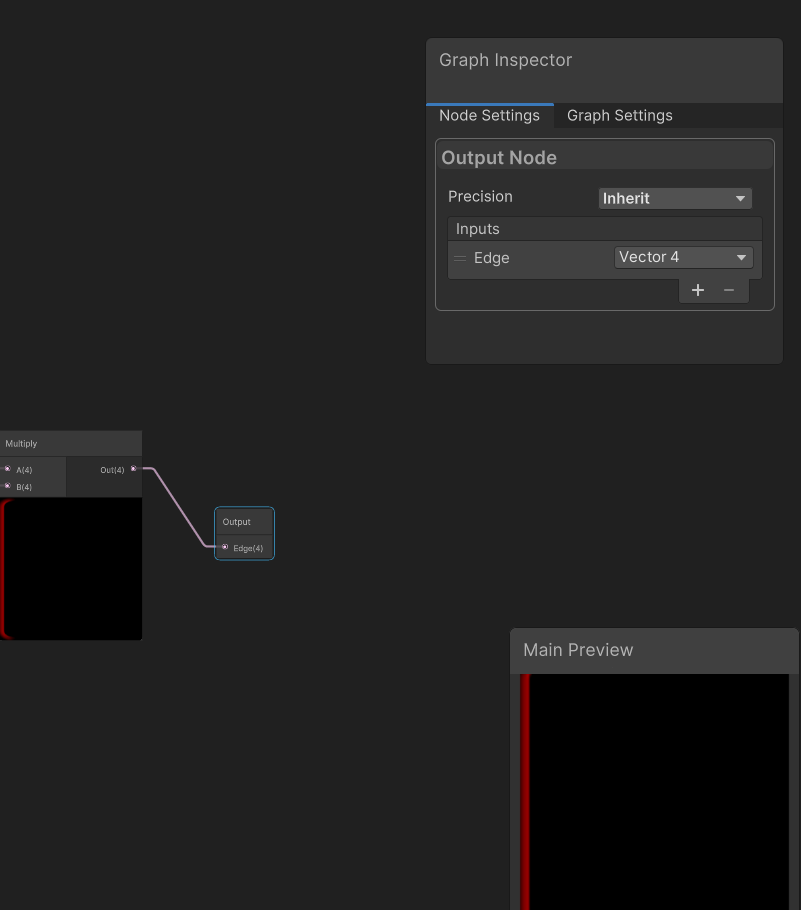
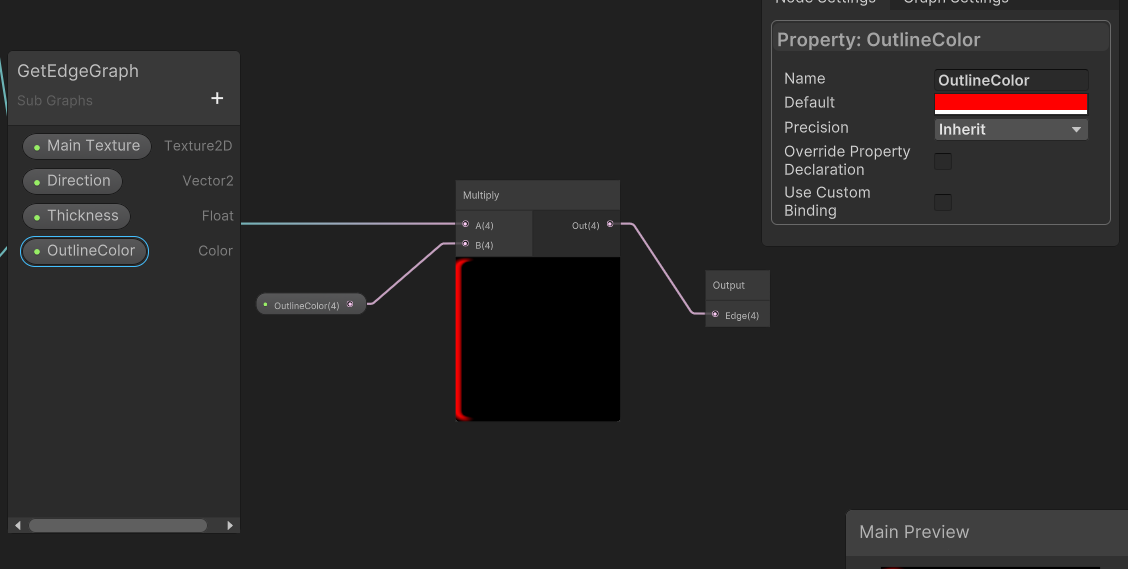
  1. 双击打开GetEdgeGraph节点。我们将看到一个名为Output的节点。选择它,然后在Graph Inspector中的Inputs部分下,单击+图标并将新参数重命名为Edge并设置Vector4的类型。将Multiply 节点输出连接到刚刚创建的Edge输入。

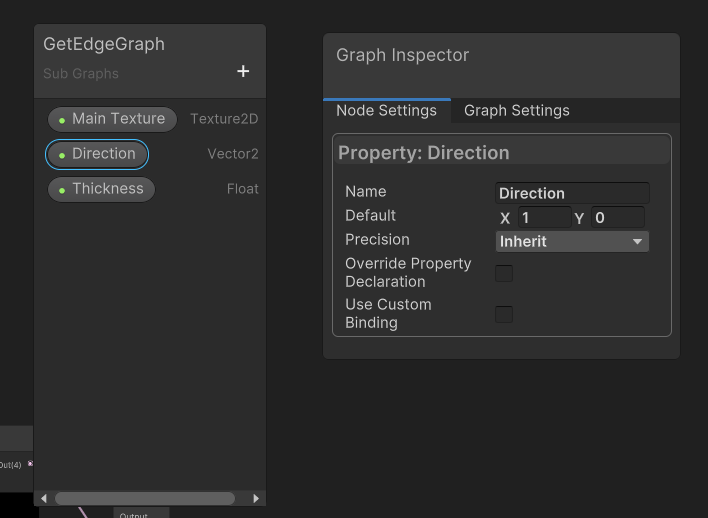
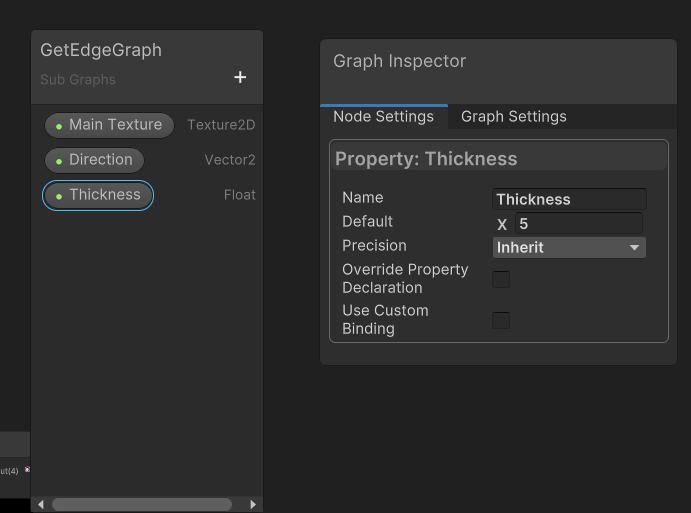
  • 接下来我使用参数来调整方向和厚度。为此,在Blackboard并单击+按钮并创建一个名为Direction的Vector2属性和一个名为Thickness的Float属性。在Graph Inspector窗口中,为Direction设置默认值(1,0)并将Thickness的默认值设置为5。
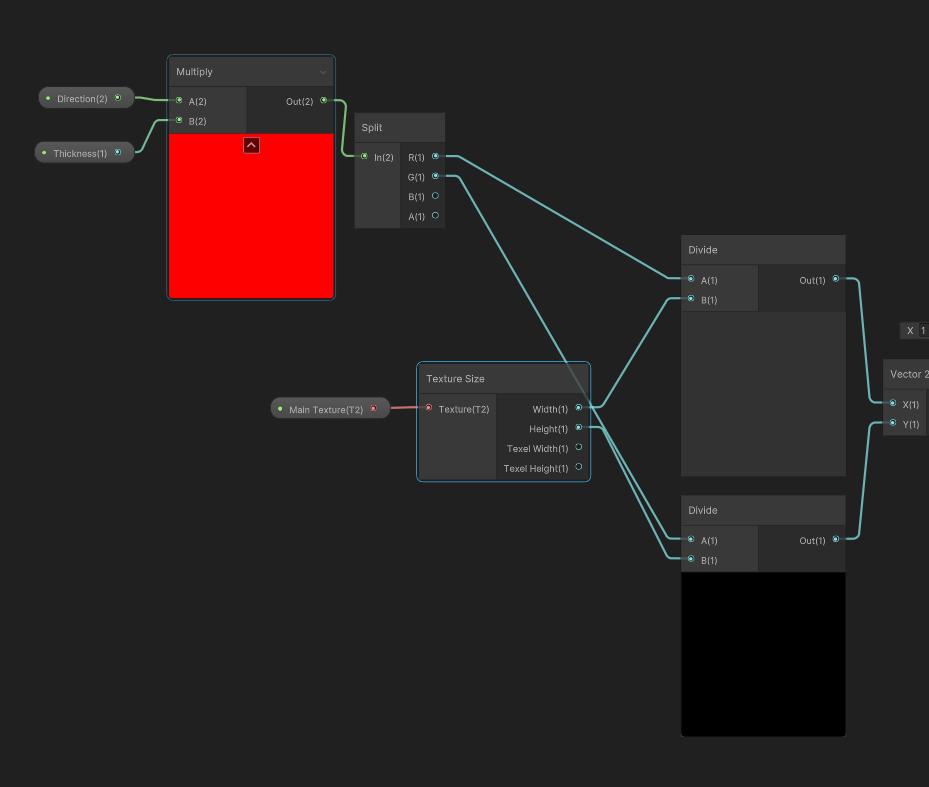
  • 将Direction拖到Divide 节点的左侧。在它的右侧,创建一个Multiply 节点,然后将Direction和Thickness作为输入连接。拖拽Multiply 节点的输出,创建一个Split 节点。将R连接到X除法的A,将G连接到Y除法的A。

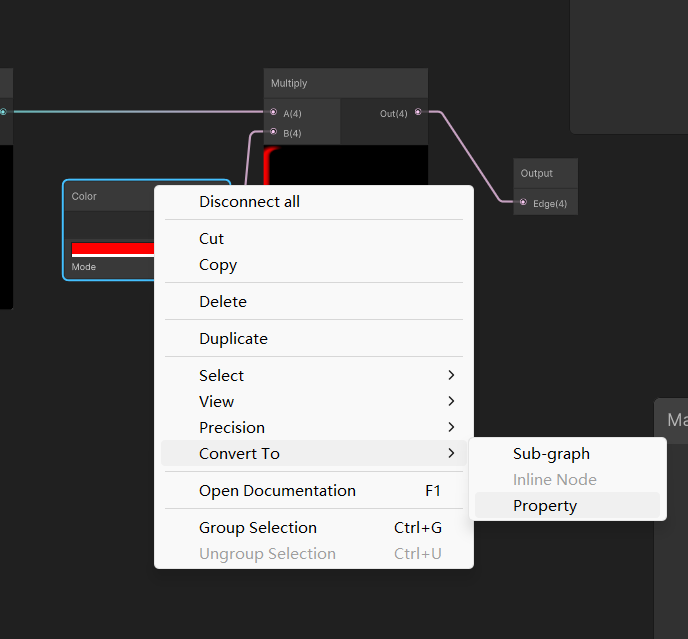
  • 最后,右键单击Color 节点并选择Convert To | Property。重命名属性为Outline Color。
  • 单击Save Asset按钮,然后返回SpriteOutlineGraph。

完成Outline着色器

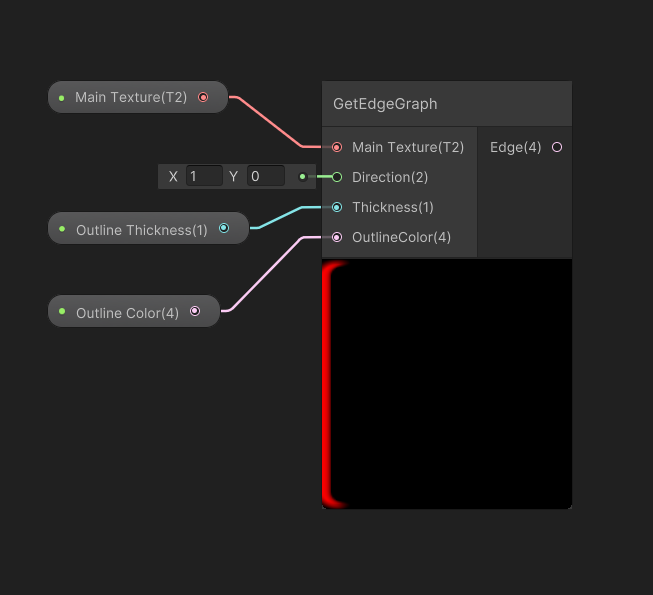
  1. 现在GetEdgeGraph可以像其他节点一样工作,我们可以通过复制和粘贴轻松多次调用它。

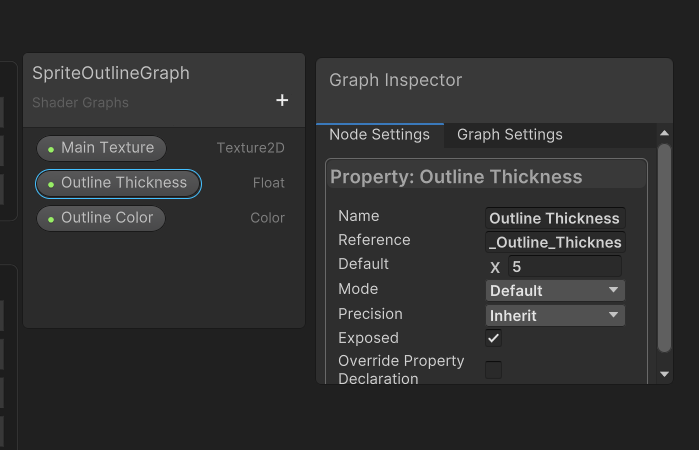
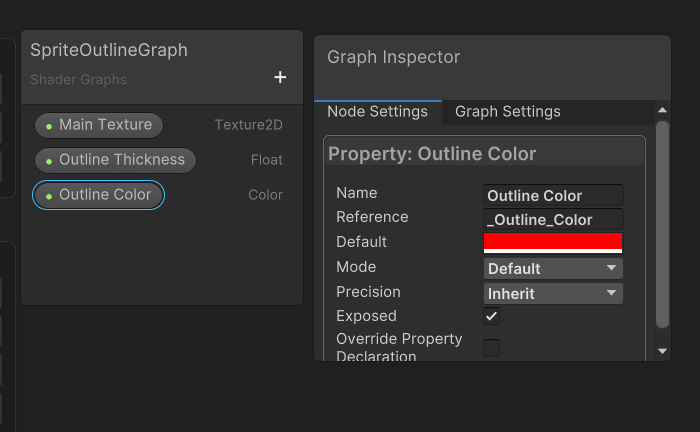
  2. 在Blackboard窗口,点击+按钮,创建一个名为Outline Thickness的Float属性和一个名为Outline Color的Color属性。将Outline Thickness的默认值设置为5,将Outline Color设置为完全不透明的红色。

  • 将这两个属性拖到Graph中,然后将它们连入GetEdgeGraph的输入。

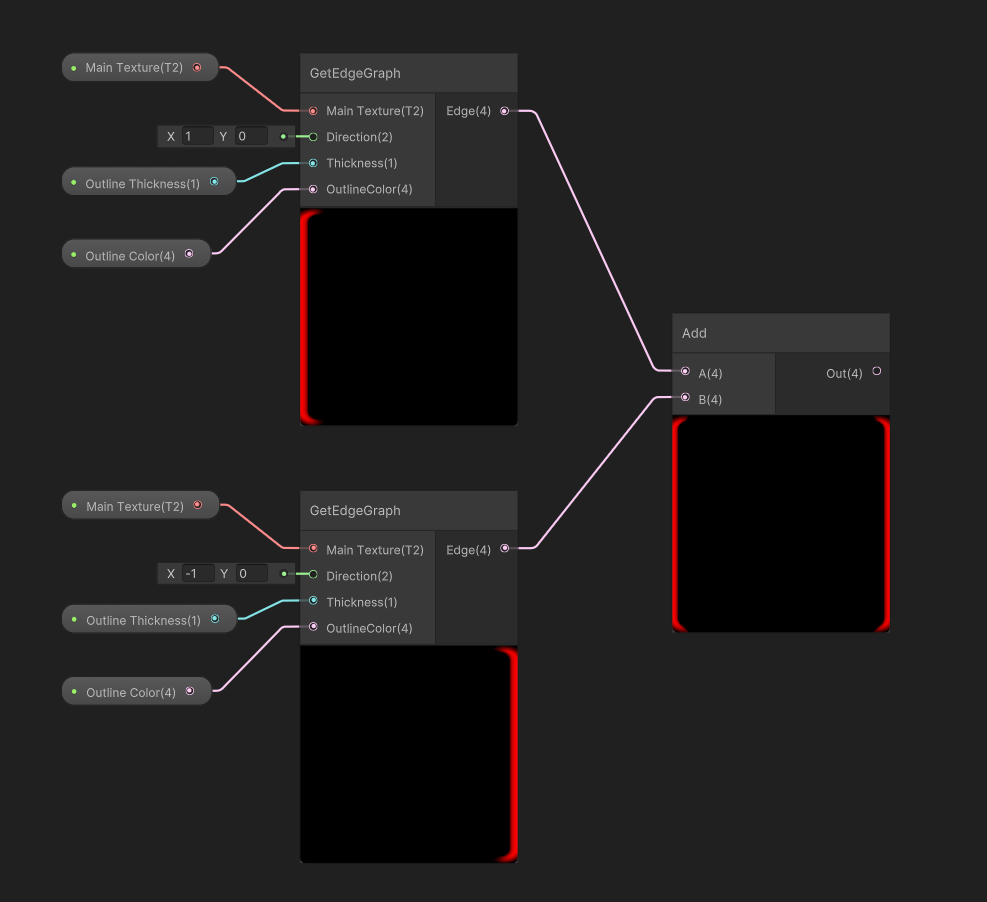
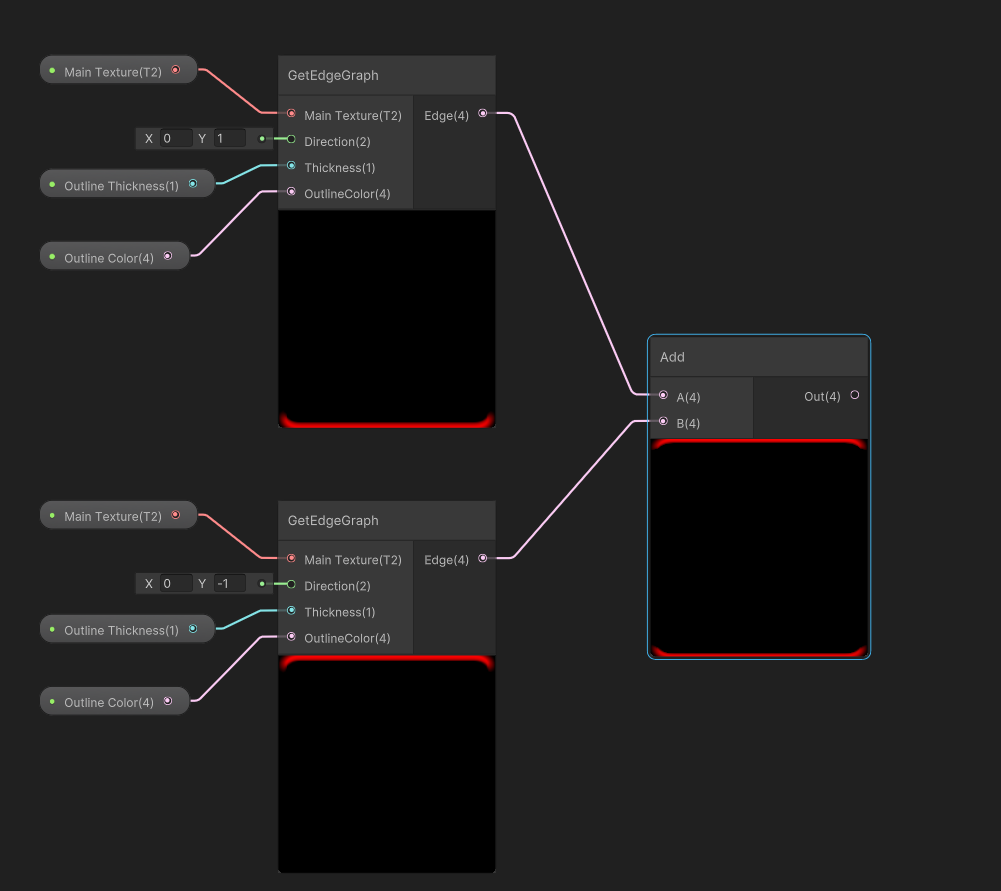
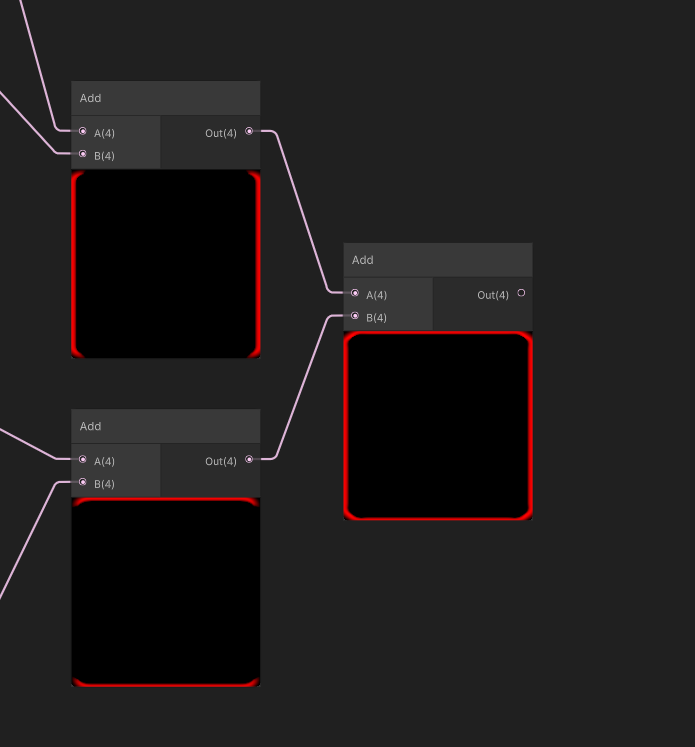
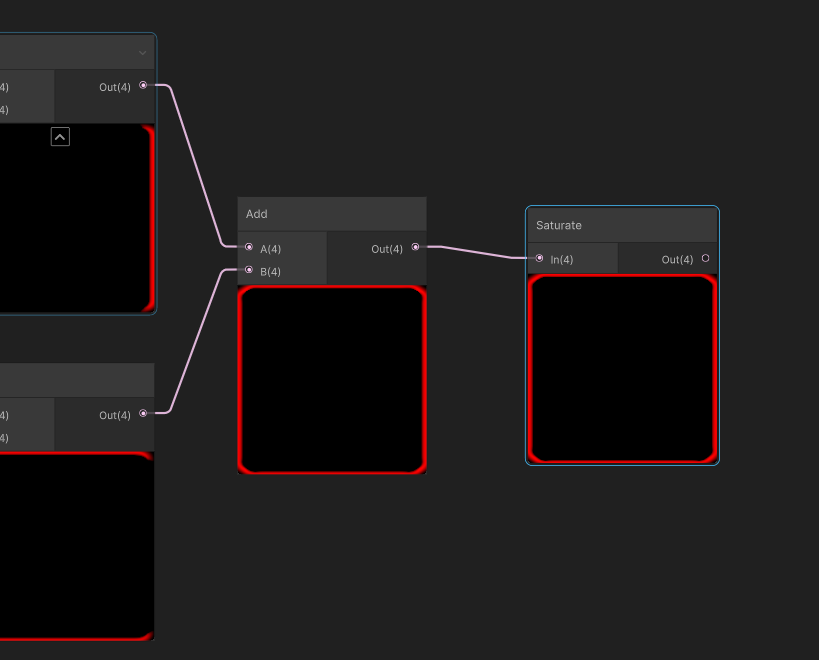
  • 我们现在将节点选中复制三次,并分别将Direction 设置为(-1,0)、(0,-1)和(0,1)。然后,创建一个Add节点将前两条边连接在一起,然后为第三条和第四条边创建一个Add节点。
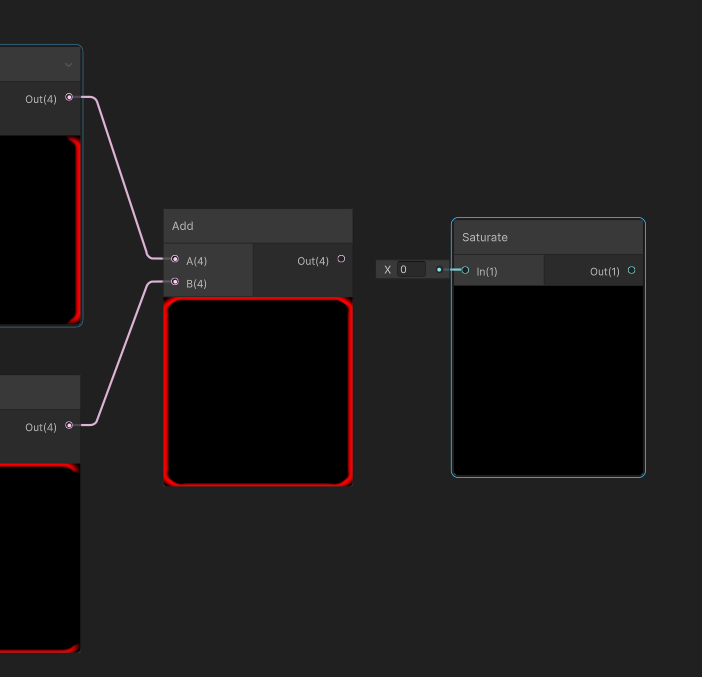
  • 然后添加一个Add节点,将两个Add节点连接在一起。

  • 在组合的Add节点的末尾,创建一个Saturate 节点,并将Add节点的Out连接到Saturate 节点的In。
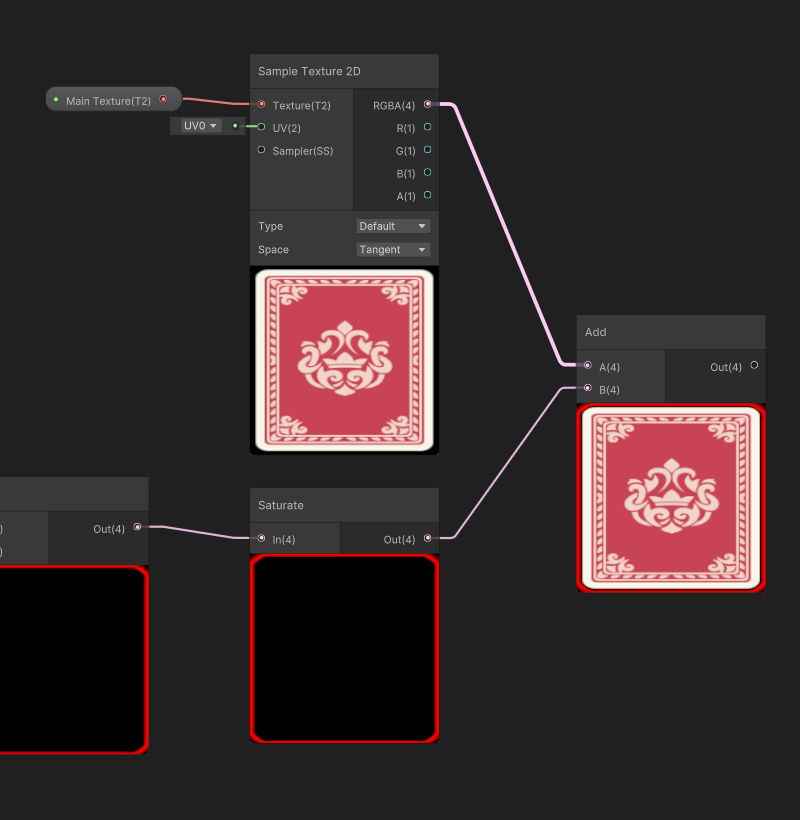
  • 现在我们有了四个边,但是我们需要将效果添加到原始Sprite中。为此,为此我们还需创建另一个具有Main Texture的Sample Texture 2D节点。

  • 从Saturate 节点的输出拖拽创建一个Add:(B) 节点,并将Main Texture的Sapmle RGBA连入A。

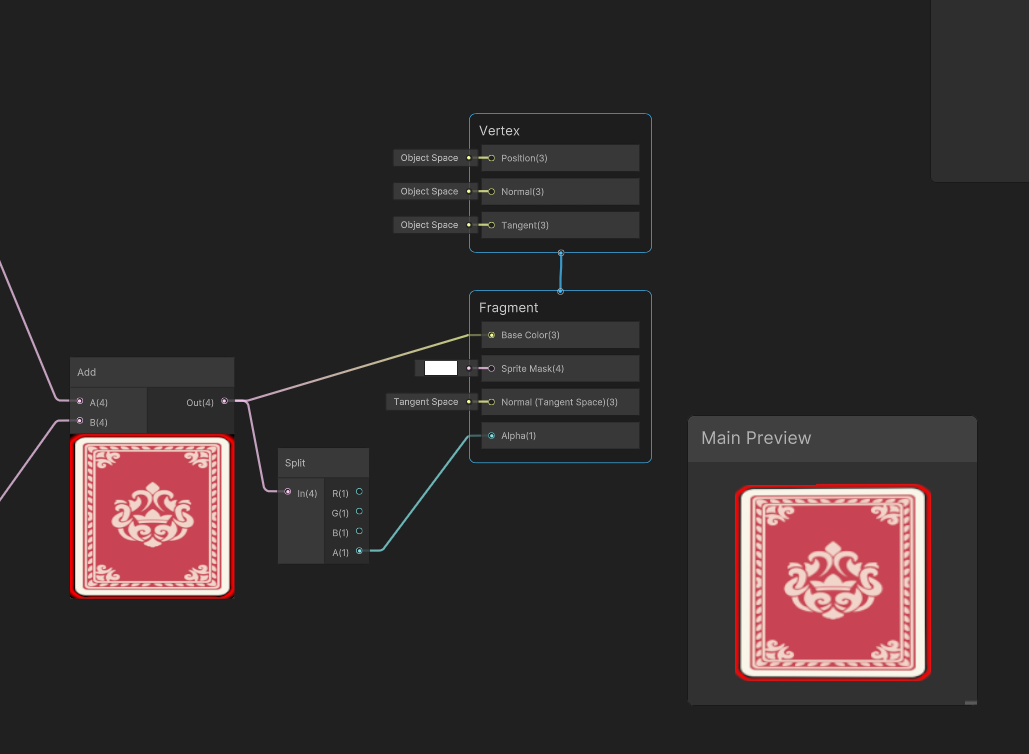
  • 我们现在可以将Out结果连接到Fragment节点的Base Color属性,但alpha无法连接。为此,在Add节点的Out右侧,创建一个Split节点。将Split节点的A连接到Fragment节点上的Alpha。

  • 点击Save Asset按钮,点击Play就可以看到最终效果。

ko-fi

思路

  • 新建一个Tag Folder 用于标识显示为Folder的Empty GameObject
  • 针对Tag为Folder的GameObject进行特殊绘制处理

用到的UnityEditor方法

Full Code

1
2
3
4
5
6
7
8
9
10
11
12
13
14
15
16
17
18
19
20
21
22
23
24
25
26
27
28
29
30
31
32
33
34
35
36
37
38
39
40
41
42
43
44
45
46
47
48
49
50
51
52
53
54
55
56
57
58
59
60
61
62
63
64
65
66
67
68
69
70
71
72
73
74
75
76
77
78
79
80
81
82
83
84
85
86
87
88
89
90
91
92
93
94
95
96
97
98
99
100
101
102
103
104
105
106
107
108
109
110
111
112
113
114
115
116
117
118
119
120
121
122
123
124
125
126
127
128
129
130
131
132
133
134
135
136
137
138
139
140
141
142
143
144
145
146
147
148
149
150
151
152
153
154
155
156
157
158
159
160
161
162
163
164
165
166
167
168
169
170
171
172
173
174
175
176
177
178
179
180
181
182
183
184
185
186
187
188
189
190
191
192
193
194
195
196
197
198
199
200
201
202
203
204
205
206
207
208
209
210
211
212
213
214
215
216
217
218
219
220
221
222
223
224
225
226
227
228
229
230
231
232
233
234
235
236
237
238
239
240
241
242
243
244
245
246
247
248
249
250
251
252
253
254
255
256
257
258
259
260
261
262
263
264
265
266
267
268
269
270
271
272
273
274
275
276
277
278
279
280
281
282
283
284
285
286
287
288
289
290
291
292
293
294
295
296
297
298
299
300
301
302
303
304
305
306
307
using UnityEngine;
using UnityEditor;

namespace kkmaple.EditorTool
{
[InitializeOnLoad]
public partial class CustomHierarchyFolder
{
#region 静态构造
static CustomHierarchyFolder()
{
EditorApplication.hierarchyWindowItemOnGUI += HierarchyWindowItemOnGUI;
}
#endregion
#region 变量
public static GameObject selectObj;
#endregion
#region 菜单
[MenuItem("GameObject/Folder/Create Folder", false, -1)]
static void CreateEmptyFolder()
{
GameObject obj = new GameObject();
Undo.RegisterCreatedObjectUndo(obj, obj.name);
if (Selection.activeTransform != null)
{
Object[] selectedObjects = Selection.objects;
GameObject selectedGameObject = selectedObjects[0] as GameObject;
obj.transform.SetParent(selectedGameObject.transform);
}
obj.name = "New Folder";
EditorUtility.SetDirty(obj);
Selection.activeGameObject = obj;
AddTag(obj, "Folder");

}
[MenuItem("GameObject/Folder/Create Folder", true, -1)]
private static bool ValidateCreateEmpty()
{
return Selection.objects.Length <= 1;
}
#endregion
#region 工具方法
/// <summary>
/// 向工程中添加tag
/// </summary>
/// <param name="tag">tag名</param>
public static void AddTagToProject(string tag)
{
Object[] asset = AssetDatabase.LoadAllAssetsAtPath("ProjectSettings/TagManager.asset");
if ((asset != null) && (asset.Length > 0))
{
SerializedObject so = new SerializedObject(asset[0]);
SerializedProperty tags = so.FindProperty("tags");
for (int i = 0; i < tags.arraySize; ++i)
{
if (tags.GetArrayElementAtIndex(i).stringValue == tag)
{
//tag已经存在啥也不做
return;
}
}
tags.InsertArrayElementAtIndex(0);
tags.GetArrayElementAtIndex(0).stringValue = tag;
so.ApplyModifiedProperties();
so.Update();
}
}
/// <summary>
/// 给指定对象添加tag
/// </summary>
/// <param name="obj"></param>
/// <param name="tag"></param>
public static void AddTag(GameObject obj, string tag)
{
AddTagToProject(tag);
obj.tag = tag;
}
/// <summary>
/// 重置GameObject位置
/// </summary>
/// <param name="obj"></param>
internal static void TransfromReset(GameObject obj)
{
obj.transform.localPosition = Vector3.zero;
obj.transform.localRotation = Quaternion.identity;
obj.transform.localScale = Vector3.one;
}
/// <summary>
/// 勾选按钮
/// </summary>
/// <param name="obj"></param>
/// <param name="selectionRect"></param>
internal static void EnableDisableToggle(GameObject obj, Rect selectionRect)
{
Rect r = selectionRect;
r.xMax = r.width;
r.x = selectionRect.xMax;
var tmpColor = GUI.color;
//设置透明
GUI.color = new Color(0, 0, 0, 0f);
if (GUI.Button(r, ""))
{
obj.SetActive(!obj.activeInHierarchy);
}
//还原颜色
GUI.color = tmpColor;
r.x = selectionRect.xMax;
GUI.Label(r, obj.activeInHierarchy ? EditorGUIUtility.IconContent("d_toggle_on_focus") : EditorGUIUtility.IconContent("d_toggle_bg"));
}
/// <summary>
/// 检查工程中是否存在tag
/// </summary>
/// <param name="tag">tag名</param>
public static bool IsTagExsist(string tag)
{
Object[] asset = AssetDatabase.LoadAllAssetsAtPath("ProjectSettings/TagManager.asset");
if ((asset != null) && (asset.Length > 0))
{
SerializedObject so = new SerializedObject(asset[0]);
SerializedProperty tags = so.FindProperty("tags");
bool exsist = false;
for (int i = 0; i < tags.arraySize; ++i)
{
if (tags.GetArrayElementAtIndex(i).stringValue == tag)
{
exsist = true;
break;
}
else
{
exsist = false;
}
}
if (exsist) return true;
else { return false; }
}
else
{
return false;
}
}
/// <summary>
/// 处理Folder显示
/// </summary>
/// <param name="instanceID">Object id</param>
/// <param name="selectionRect"></param>
internal static void HierarchyWindowItemOnGUI(int instanceID, Rect selectionRect)
{
GameObject obj = EditorUtility.InstanceIDToObject(instanceID) as GameObject;

if (obj == null)
{
selectObj = null;
return;
}
if (obj.transform == Selection.activeTransform)
{
selectObj = obj;
}

Rect r = selectionRect;

if (!IsTagExsist("Folder")) return;

//处理Folder显示
if (obj.CompareTag("Folder"))
{
EnableDisableToggle(obj, selectionRect);

//重置位置
TransfromReset(obj);

//隐藏编辑选项
obj.transform.hideFlags = HideFlags.NotEditable | HideFlags.HideInInspector;
obj.hideFlags = HideFlags.HideInInspector;

//在Hierarchy中不可pick
var sv = SceneVisibilityManager.instance;
sv.DisablePicking(obj, false);

GUI.color = new Color(1, 1, 1, 1);
r.xMin = selectionRect.x + 1;
r.xMax = r.xMin + 15f;

bool isPro = EditorGUIUtility.isProSkin;
if (obj.transform == Selection.activeTransform)
{
if (isPro) EditorGUI.DrawRect(r, new Color(0.17f, 0.36f, 0.52f, 1f));
else { EditorGUI.DrawRect(r, new Color(0.23f, 0.45f, 0.69f, 1f)); }
}
else
{
if (isPro) EditorGUI.DrawRect(r, new Color(0.22f, 0.22f, 0.22f, 1f));
else { EditorGUI.DrawRect(r, new Color(0.8f, 0.8f, 0.8f, 1f)); }
}

r = selectionRect;
r.x = selectionRect.xMin + 25;

if (obj.activeInHierarchy)
{
ChangeFolderIconActive(obj, selectionRect);
}
else
{
ChangeFolderIconDactive(obj, selectionRect);
}
}
}
/// <summary>
/// Folder Icon Active
/// </summary>
static void ChangeFolderIconActive(GameObject obj, Rect selectionRect)
{
int childcout = obj.transform.childCount;
bool isExtended = true;
string iconeName = string.Empty;
bool hasChild = childcout > 0;
if (hasChild)
{
if (EditorGUIUtility.isProSkin)
{
if (isExtended)
{
iconeName = "FolderOpened On Icon";
}
else
{
iconeName = "Folder On Icon";
}
}
else
{
if (isExtended)
{
iconeName = "FolderOpened Icon";
}
else
{
iconeName = "Folder Icon";
}
}
}
else
{
if (EditorGUIUtility.isProSkin)
{
iconeName = "FolderEmpty On Icon";
}
else
{
iconeName = "FolderEmpty Icon";
}
}
EditorGUI.LabelField(selectionRect, EditorGUIUtility.IconContent(iconeName));
}

/// <summary>
/// Folder Icon Dactive
/// </summary>
static void ChangeFolderIconDactive(GameObject obj, Rect selectionRect)
{
int childcout = obj.transform.childCount;
bool isExtended = true;
string iconeName = string.Empty;
bool hasChild = childcout > 0;
if (hasChild)
{
if (EditorGUIUtility.isProSkin)
{
if (isExtended)
{
iconeName = "FolderOpened Icon";
}
else
{
iconeName = "Folder Icon";
}
}
else
{
if (isExtended)
{
iconeName = "FolderOpened On Icon";
}
else
{
iconeName = "Folder On Icon";
}
}
}
else
{
if (EditorGUIUtility.isProSkin)
{
iconeName = "FolderEmpty Icon";
}
else
{
iconeName = "FolderEmpty On Icon";
}
}
EditorGUI.LabelField(selectionRect, EditorGUIUtility.IconContent(iconeName));
}
}
#endregion
}
0%